
VideoToTranscript Explains Video to Text, YouTube Transcript Generation, and SRT/VTT Subtitle Export
Manual transcription has a brutal math problem. A skilled transcriptionist needs four to six hours to process a single hour of audio. For a team sitting on weekly webinars, interviews, and meeting recordings, that backlog turns raw footage into content that never ships. AI transcription collapses the same hour into a few minutes. The interesting part is not the speed. It is what becomes possible once speech is text.
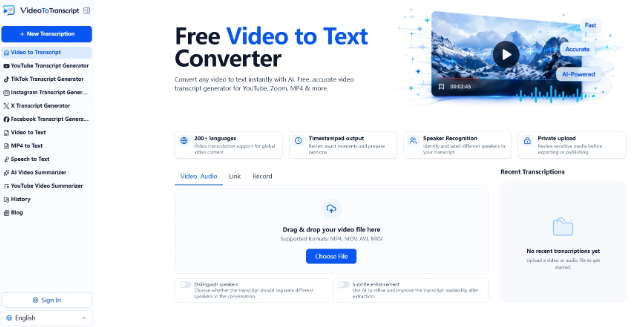
VideoToTranscript built its video to text workflow around exactly that shift: upload a video, get back editable, timestamped text, then put it to work.
The accuracy question nobody should skip
Transcription quality is measured with a metric called Word Error Rate, or WER. It counts the words a system substitutes, drops, or inserts by mistake. Lower is better. A 5 percent WER means 95 of every 100 words are correct.
Modern automatic speech recognition sits in a wide band. In clean studio audio, the best commercial models reach 95 to 98 percent accuracy, which is close to a human professional. In a typical home recording that slips to 92 to 96 percent. In a meeting with background noise and overlapping voices it falls to roughly 88 to 94 percent, and in genuinely noisy environments it can land near 85 percent. Human transcriptionists still hold the top end at about 99 percent, but they cannot match the turnaround.
The takeaway is practical. AI transcription is now good enough for the vast majority of everyday content, from a recorded demo to a podcast episode. The occasional error in a caption file rarely sinks a video. A missing transcript, on the other hand, leaves that content invisible to search and to silent viewers.
How a video becomes text
The pipeline is shorter than people expect. It runs as five steps.
Audio extraction
The tool strips the audio track from the video file automatically, so you never preprocess the container. MP4, MOV, WebM, and most common formats work without extra steps.
Speech recognition
A speech recognition model converts the sound into words. Modern systems use deep neural networks trained on large labeled audio sets, which is why they handle accents and speaking pace far better than the older generation.
Context cleanup with a language model
A language model then fixes word choice using context, so the right phrase wins over something phonetically identical but nonsensical. This is the step that turns a raw word stream into readable sentences.
Punctuation, capitals, and speaker labels
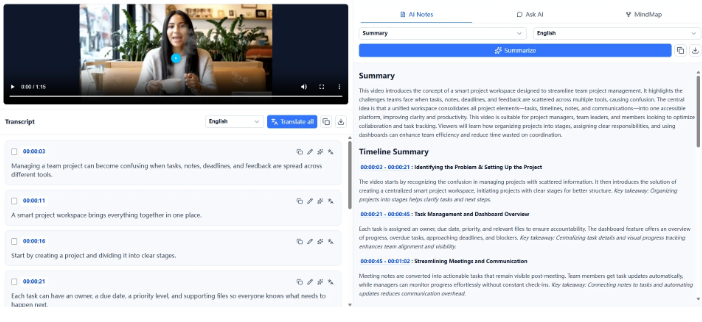
Post-processing adds punctuation, capital letters, and speaker tags. Speaker diarization clusters voices and labels each block with Speaker 1, Speaker 2, so you can follow who said what without replaying the clip. It earns its keep in interviews and panels.
Export formats that drop into any editor
The output exports as plain text, as a Word document, or as subtitle files in SRT and VTT formats that load straight into YouTube Studio or a video editor.
Why the text matters more than the caption
A transcript is often treated as a subtitle byproduct. It is really the most reusable asset a video produces.
Search engines read text, not video
Search engines cannot watch a video. They read text. Once a transcript exists, Google and YouTube can index the full spoken content, which lets a single video rank for hundreds of keyword variations the title and description would never capture. That is a direct discovery win, and it compounds as more pages link to the content.
Accessibility is not optional
The World Health Organization estimates more than 430 million people live with disabling hearing loss. Captions and transcripts are how that audience reaches video at all. In many regions, accurate captions are also a compliance expectation under standards like WCAG.
One transcript, many assets
A course creator turns a lecture into a study guide. A podcaster ships show notes the same afternoon. A researcher quotes a source without replaying an hour of footage. One transcript becomes a blog draft, a newsletter, and a stack of social pull quotes. The work shifts from writing from nothing to editing something already correct.
The behavior data backs this up. Roughly 85 percent of people watch social video with the sound off, and videos that carry captions see meaningfully longer average watch time. Captions are not a nice to have. They are how most of an audience actually consumes the video.
The YouTube problem
YouTube already generates captions automatically, which leads many creators to skip a dedicated tool. That is a mistake. Auto-captions are built for speed, not fidelity, and published benchmarks put them far below a cleaned transcript, often in the low-60s percent accuracy range versus the high-90s for reviewed output. On technical content, names, and numbers, that gap shows up immediately.
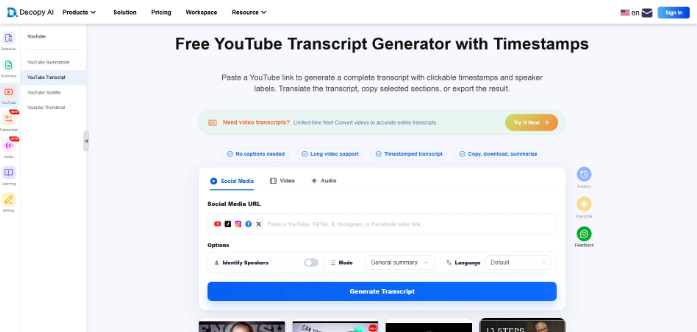
A purpose built YouTube transcript generator fixes this by pulling the dialogue from a public video through a link and running it through a stronger model, then handing back an editable transcript with timestamps. The creator corrects the handful of terms that matter, exports the SRT, and uploads it. The result is accurate captions from day one instead of auto-generated text that mislabels the video in search.
The cost math
The speed difference gets the attention, but the cost difference is what changes behavior. A 10 minute video sent to a human transcriptionist typically runs 80 to 160 dollars and returns in days. AI transcription of the same file costs one to four dollars and returns in minutes. At four videos a month, the human route costs hundreds while the AI route costs about the price of a coffee. That gap is why transcription moved from an occasional line item to a default step in the publish workflow.
Where AI still struggles
Honesty matters here. AI transcription is not magic, and four conditions consistently break it.
Background noise
HVAC hum, traffic, and music underneath speech push error rates up fast. A decent microphone beats a better model almost every time.
Overlapping speech
Two people talking at once is harder than one clear voice, and most systems either drop a speaker or produce garbled text in the crossover.
Specialized vocabulary
Drug names, legal terms, product codes, and brand names get swapped for something phonetically close. Some tools let you upload a custom glossary to close the gap.
Accents
Models trained on one speech variety perform best on it, and the gap widens in noisy conditions.
None of this makes AI transcription unusable. It means the last three to five minutes of a job belong to a human review, especially on anything technical or public.
Using it without wasting the speed
A five minute workflow
Record with the best microphone you have. Run the video through a video to text tool. Skim the transcript for names, numbers, and jargon. Export what you need: SRT for captions, VTT for web players, DOCX for notes, plain text for repurposing. The whole pass takes minutes, not the hours manual transcription demands.
Availability
VideoToTranscript runs in any modern browser and needs no software install. The video to text and export tools are available now, alongside YouTube transcript generation for public videos. Both tools are free to try and work on any modern browser.
About VideoToTranscript
VideoToTranscript is an online tool that converts video and audio into accurate, editable text, with timestamps, speaker labels, and subtitle exports in SRT and VTT. It helps creators, teams, and researchers turn recorded content into searchable, reusable material without manual transcription.
Media Contact
Company Name: Video to Transcript
Email: support@videototranscript.com
Website: https://videototranscript.com/